.svg)


We’re rolling out two updates to SimpliContract during the week of July 19.
These updates are designed to make everyday contract work smoother, especially when users are editing documents in Word Online or working with analytics results.
One update helps protect the latest version of a document before it is published. The other makes it easier to ask questions on top of analytics data and get answers in plain language.
Here’s what’s coming.
1. Safer publishing after Word Online edits
When teams are working on contracts, the smallest missed edit can create confusion later.
To help prevent that, SimpliContract is updating how publishing works after a document is edited in Word Online.
What’s changing?
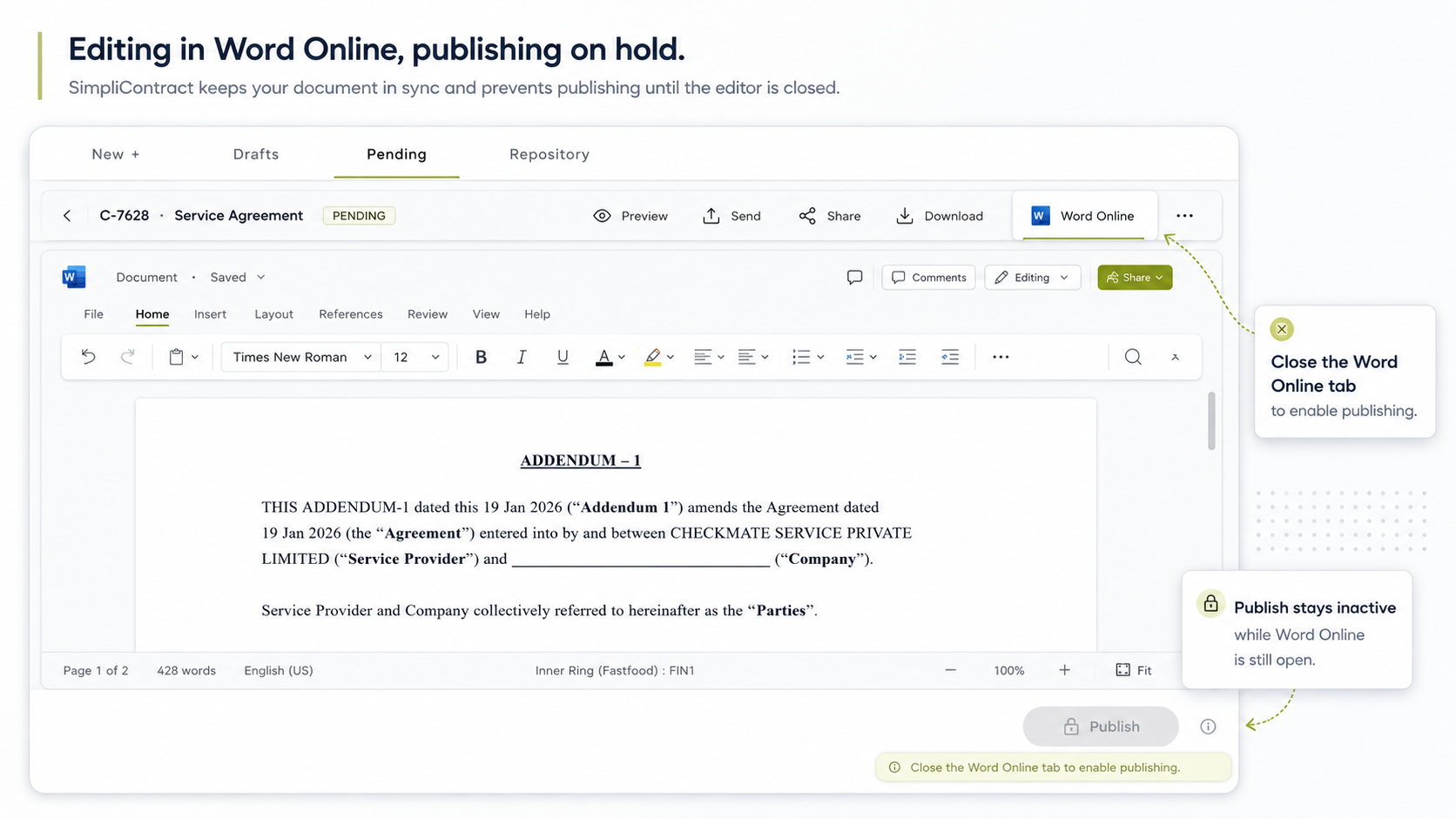
When a user edits a document in Word Online and returns to SimpliContract, the Publish button will stay inactive until the Word Online tab is closed.
Once the Word Online tab is closed and the latest changes are saved, the Publish button will become active again.
Why this matters
This helps ensure the latest edits are saved before the document is published.
Previously, users could return to SimpliContract and click Publish while the latest Word Online save was still in progress. In some cases, that could mean the published version may not include the most recent edit.
With this update, SimpliContract adds an extra step of protection before publishing.
What users need to do
After editing a document in Word Online:
- Finish your edits in Word Online.
- Close the Word Online tab.
- Return to SimpliContract.
- Publish once the button becomes active.
This small change helps make publishing safer and more reliable.
2. Analyze for On-Demand Analytics
On-Demand Analytics helps users generate contract data in a structured view.
Soon, users with Analyze enabled will be able to go one step further: ask questions on top of that analytics data in plain language.
What’s changing?
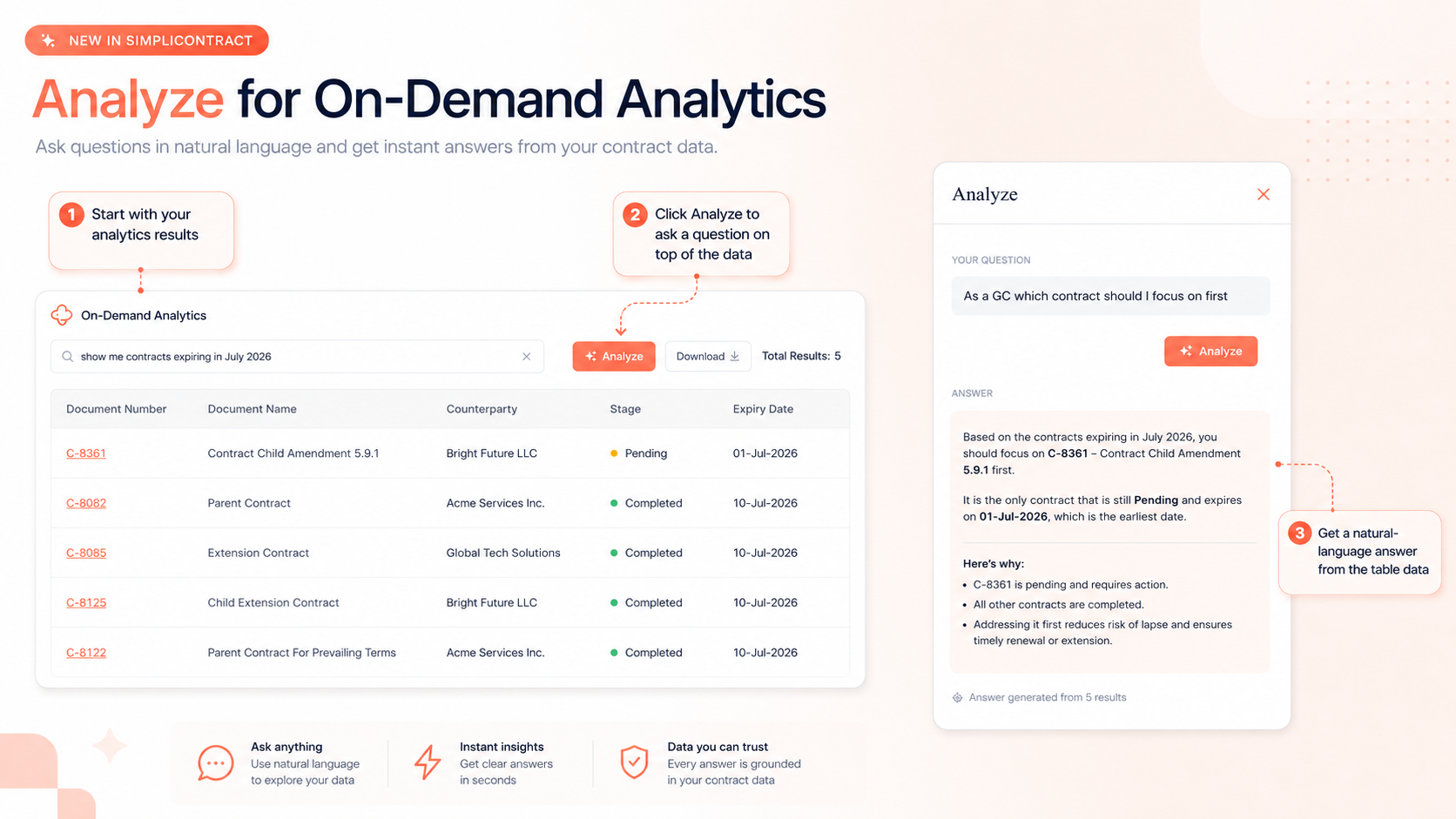
A new Analyze option will be available on On-Demand Analytics results.
After running an analytics query, users can click Analyze and ask a question about the results they are seeing.
For example: “As a GC, which contract should I focus on first?”
Analyze will then return a natural-language response based on the analytics result set.
Why this matters
Not every user wants to manually review rows of contract data to find the answer.
Analyze helps users move from Data → Question → Answer
Instead of spending time reading through a table, users can ask what they need to know and get a clearer answer faster.
This is especially useful when teams want to quickly understand priorities, risks, dates, or next actions from their contract data.
What users need to do
For workspaces where Analyze is enabled:
- Run an On-Demand Analytics query.
- Review the results.
- Click Analyze.
- Ask a question in plain language.
- Review the response generated from the analytics data.
Good to know
Analyze for On-Demand Analytics is a configurable capability and may not be enabled by default for every workspace.
Want to explore Analyze for your workspace? Reach out to your SimpliContract account team.
Small updates, smoother workflows
Both updates are designed around everyday user moments.

The Word Online publishing update helps protect document accuracy before publishing. Analyze for On-Demand Analytics helps users get clearer answers from their contract data with less manual review.
We’ll continue sharing updates as these improvements roll out during the week of July 19.
For questions, please get in touch with your SimpliContract account team.
Frequently asked questions
Why is the Publish button inactive after editing in Word Online?
The Publish button will stay inactive until the Word Online tab is closed. This helps ensure the latest edits are saved before the document is published, reducing the risk of publishing an older version by mistake.
What do users need to do after editing in Word Online?
After finishing edits in Word Online, users should close the Word Online tab and return to SimpliContract. Once the latest changes are saved, the Publish button will become active again.
What is Analyze for On-Demand Analytics?
Analyze lets users ask questions on top of On-Demand Analytics results in plain language and get a natural-language answer from the data. For example, after generating a result set, a user can ask which contract needs attention first and review the answer without manually scanning every row.
Will Analyze be available for every workspace?
Analyze is a configurable capability and may not be switched on by default for every workspace. Teams interested in using it can reach out to their SimpliContract account team to explore enabling it for their use case.
TL;DR
Two SimpliContract updates are rolling out during the week of July 19:
Safer publishing: After editing in Word Online, users will need to close the Word Online tab before publishing, helping ensure the latest changes are saved.
Analyze for On-Demand Analytics: Users with Analyze enabled can ask questions on analytics results in plain language and get clear answers from the data.